For Skype, Zoom and Teams: New filter shows gestures as speech bubbles
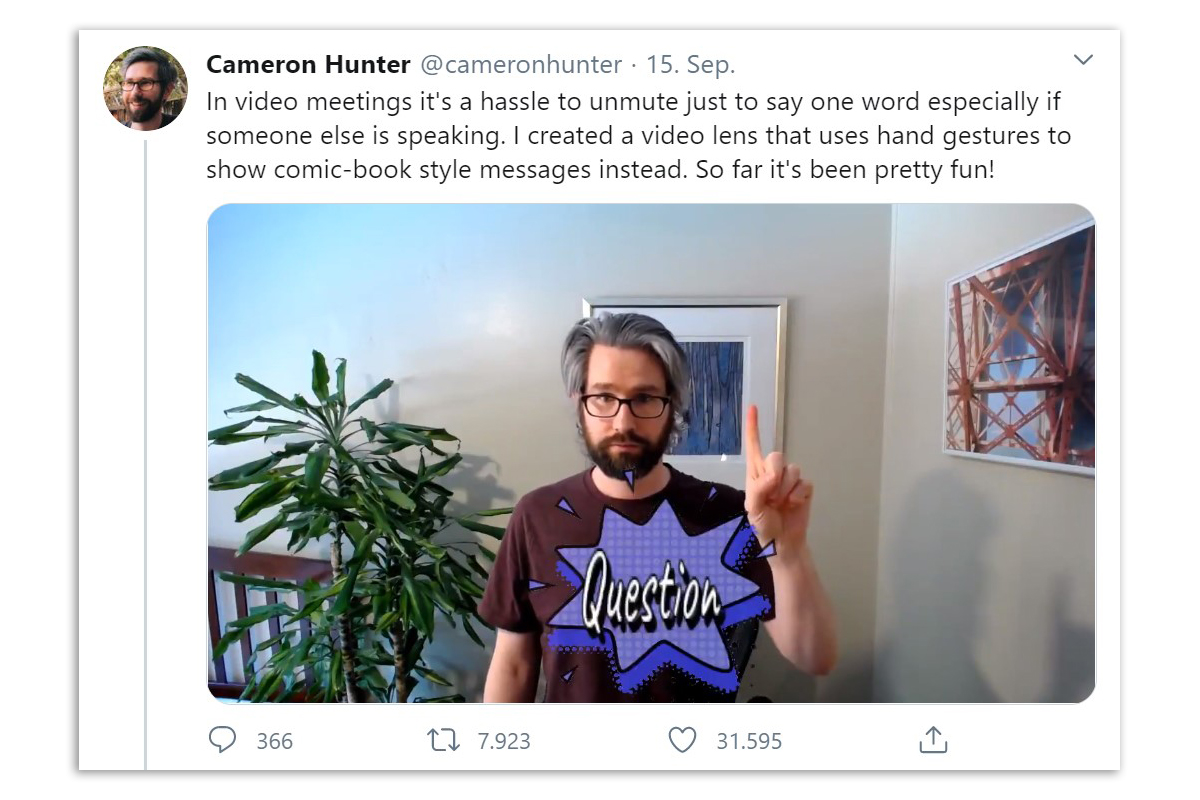
A new filter in the Snapchat application "Snap Camera" illustrates the gestures of video conference participants with the help of comic speech bubbles. The application, programmed by Netflix technician Cameron Hunter, makes it easier for users who are muted in meetings to make themselves understood. Filters on Snap Camera are compatible with the Zoom, Google Hangout, Google Meet and Skype apps.


"Muted participants in video calls often find it difficult to make themselves understood. A visually clear sign makes communication easier. Especially when voting, it saves the moderator a lot of time if they don't have to ask each participant individually. Many people are also more visually oriented and take in information better this way," explains social media expert Tim Weisheit in an interview with the news portal Pressetext.
A speech bubble with the word "Yes" appears on the filter when users hold their thumb up. A raised fist, on the other hand, leads to a "No". If call participants hold up a hand with the palm facing forward, they say "Hello". If they want to ask a question, they raise their index finger and the speech bubble "Question" appears.
Teufelshorn is "Awesome"
Users can also quickly express their enthusiasm with the filter. When they make the devil's horn with their fingers, an enthusiastic "Awesome" appears. A grin triggers a laughing speech bubble. For users who move sideways out of the picture, the caption says "I'll Be Right Back!" ("I'll be right back!"). By contrast, conference participants say "Goodbye" with a peace sign.
According to Hunter, it only took one evening to program the filter. To use the feature, users must first download the Snap Camera software. Then they must install the Filters from Cameron Hunter install. You can then define the Snap Camera as a video source on the video conferencing apps Zoom, Skype, Google Hangout and Google Meet and use the speech bubbles in calls. (pte)